
Using download credits for free tours and voucher codes
4 min readDownload credits are the currency behind two of VoiceMap's most flexible distribution options: making your tour free for anyone to download, and issuing voucher codes to distribute your tour through your own channels.
Each credit is valid for a single download of your tour. Credits are deducted from your balance when someone downloads a free tour or redeems a voucher code. No credits are used when a listener pays for a download through the VoiceMap apps, the website, or our resellers.
Using credits for free tours
If you want your tour to be free for anyone to download at voicemap.me and in the VoiceMap apps, you'll need download credits. Each time someone downloads your free tour, one credit is deducted from your balance.
Free tours work well across a wide range of contexts. The Apartheid Museum in Johannesburg uses a free tour to guide visitors through its permanent exhibition and a natural fit for an institution whose mission is public education. The Theatreland Tour with Ian McKellen, produced by Official London Theatre, is free because it works as a piece of cultural programming: a walking tour of London's West End narrated by one of Britain's most celebrated actors, from Leicester Square through to The Strand. The KC Rainbow Tour in Kansas City, created by storyteller Joel Barrett, is a free driving tour through the city's LGBTQ+ history, rooted in archival research and oral histories from community members who lived those stories.
Other common uses include tours funded by sponsorship or grants, tours produced for hotels or attractions as a guest amenity, and community or educational projects where charging would undercut the purpose.
Using credits for voucher codes
Voucher codes let you distribute your tour through your own channels without making it publicly free. You can give codes away, sell them directly through your own website, for example, or supply them to resellers and other distributors in bulk. VoiceMap only charges you for the credit. After that, you keep all the revenue.
For the full how-to on creating and managing voucher codes, see Using voucher codes.
How you receive credits
Every publisher receives complimentary Feedback credits: 10 when you create your first tour, and 10 more each time you publish a tour. You can use these to test your tour and to share it with friends and family in exchange for early ratings and reviews.
If you're on a Pro or Premium plan, you also receive credits as part of your plan: 1,000 per year on Pro, and 5,000 per year on Premium. These are added to your balance when your plan renews.
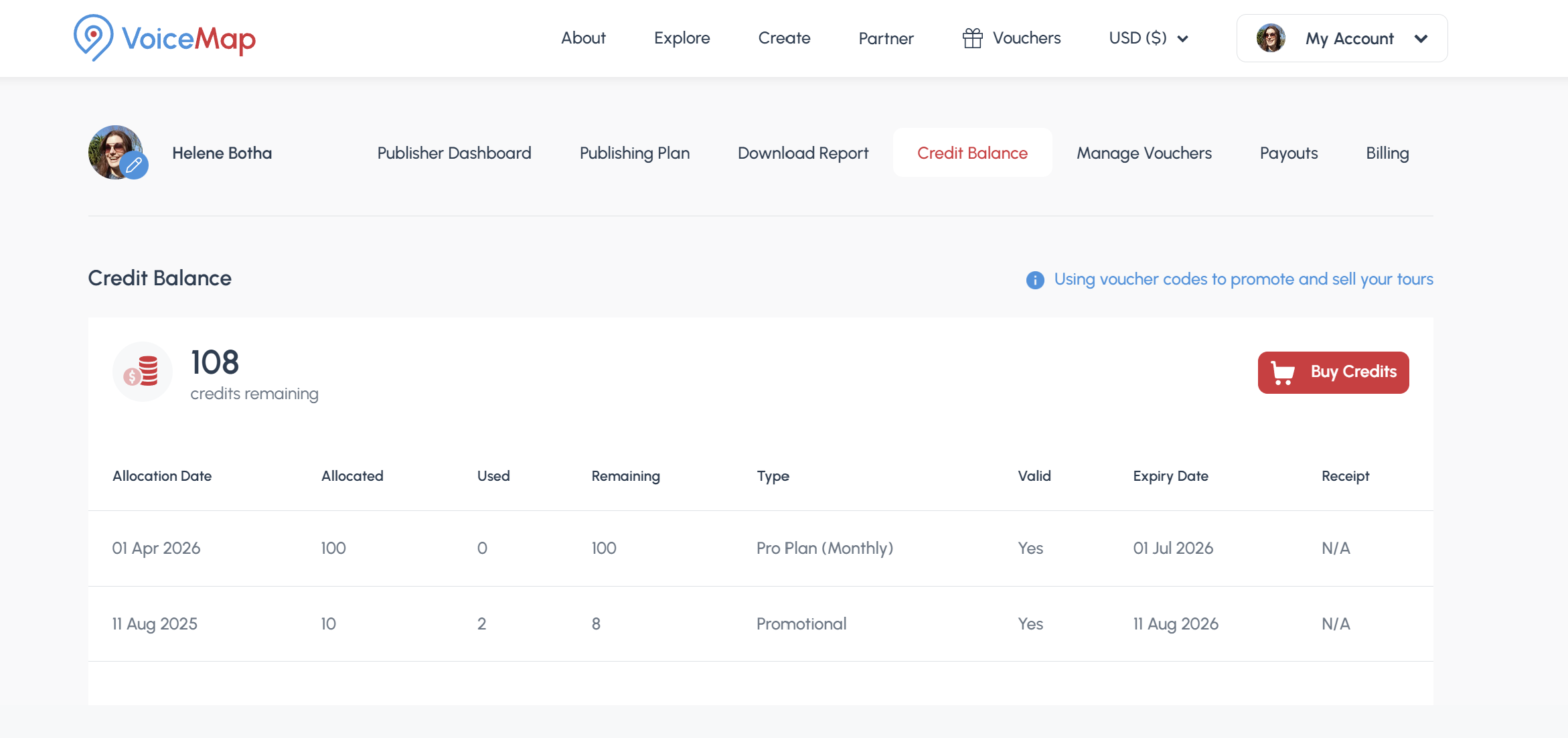
Track and purchase credits
The Credit Balance tab shows all your credit allocations: your Feedback credits, any credits received as part of your publishing plan, and any credits you have purchased. You can also buy additional credits here. Click Buy Credits, enter the number you would like, and complete the payment. Credits are added to your balance immediately.
Credit pricing
Additional credits are priced as follows:
- Basic Plan: $2.50 per credit
- Priority Plan: $1.50 per credit
- Pro Plan: $0.75 per credit (plan includes 1,000 credits per year)
- Premium Plan: $0.38 per credit (plan includes 5,000 credits per year)
Credit expiry
To keep your account active and your tours running smoothly, it's important to keep track of your credit balance and expiry dates.
All credits expire after a set period from the date they are issued:
- Credits included in annual Pro and Premium plans expire after 12 months.
- Credits included in monthly Pro and Premium plans expire after 90 days.
- Feedback credits and any additional credits you purchase expire after 12 months.
Expiry dates are shown on the Credit Balance tab of your publisher dashboard. You will receive an email reminder before any credits are close to expiring, but if you are actively using vouchers or running a free tour, it is worth checking your balance regularly to avoid any disruption. If you're on a Pro or Premium plan, your new annual or monthly credits will automatically be added to your balance.